Lab log 1: How can computers detect malicious code?
Intro
Before going any further, I want to point out that the term “malware” in this context specifically refers to malicious code targeting the Windows operating system. Specifically, we are discussing Portable Executable files, which commonly have extensions such as .exe, .dll, and .bin. However, the principles below can also be understood as general detection mechanisms applicable to other types of malware, such as those for Linux or Android phones. There are many methods to assess whether a file is malware or not, but they are generally categorized into two main approaches: static analysis and dynamic analysis!
Static analysis (Static analysis)
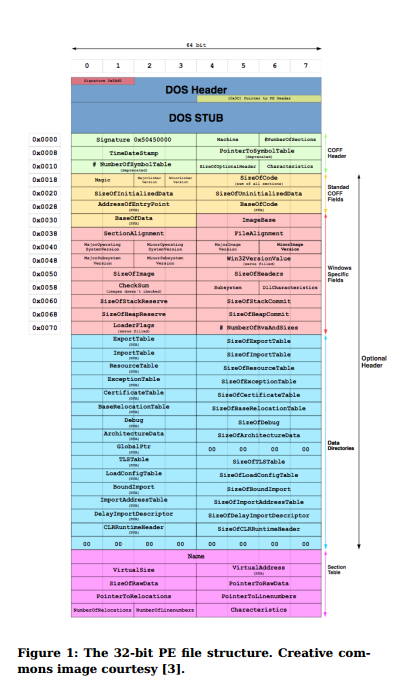
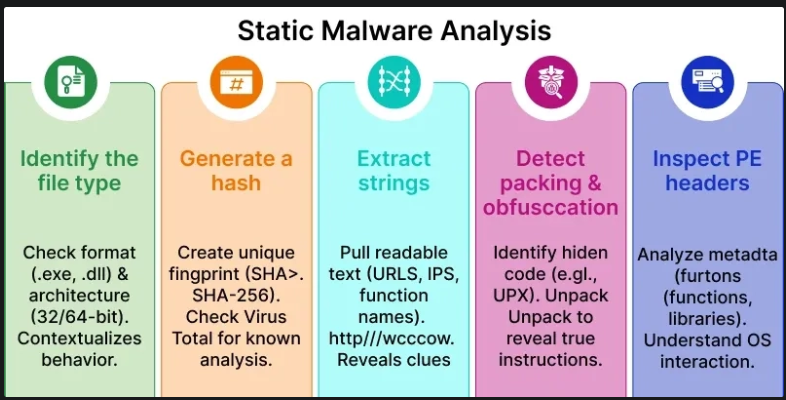
This is the simplest type of analysis, focusing solely on a file’s appearance and structure. From this, one can infer whether a file is malicious or benign. For example, if a person enters a bank with a concealed gun, we can predict they intend to rob it. Similarly, if a file exhibits an unusual header and contains code that attempts to read and encrypt other files, it is highly likely to be ransomware. There are many ways to extract the characteristics of a PE file. One common method involves examining the file’s signature, often derived from its content using a hash function. Alternatively, analyzing the raw binary content (1s and 0s) of the file. When translated into assembly language, this reveals a wealth of information, including the file’s header, sections, imports, as well as its bytecode and opcodes.
Advantages of this approach:
- Quick and straightforward, requiring minimal computational overhead.
- Low resource consumption; a few lines of code or dedicated tools can instantly provide relevant information.
Disadvantages:
- Cannot fully evaluate the complete functionality of a PE file or understand its runtime context.
- Ineffective against obfuscated malware. Such malware encrypts its malicious fragments to evade static analysis detection, only decrypting and executing the malicious code during runtime.
Dynamic analysis (Dynamic analysis)
Dynamic analysis is a high-precision method that observes the actual behavior of malware during execution. Much like a surveillance camera, it meticulously monitors every action of a PE file to determine if it’s malicious or legitimate software. How are these observations made? There are two primary approaches: virtual environments (sandboxes) and real-time monitoring. A sandbox is an isolated virtual environment designed to mimic a typical user’s computer. It contains data files and common applications like browsers and office suites. It might even simulate scenarios such as disabling Windows Defender to download game cracks, or engaging in daily interactions like browsing web addresses, reading news, or opening documents. However, all these activities are executed within a virtual machine, purely for observation. It’s an elaborate deception for the malware! When malware is executed within this sandbox, all its actions, processes, network communications (where it tries to contact), and state changes are meticulously recorded and monitored. Once the analysis is complete, the sandbox simply reverts to its original snapshot from before the malware execution, returning to a completely clean and safe state, much like Ekko’s R ability. This provides a wealth of information, sufficient to determine conclusively whether a file is malicious!
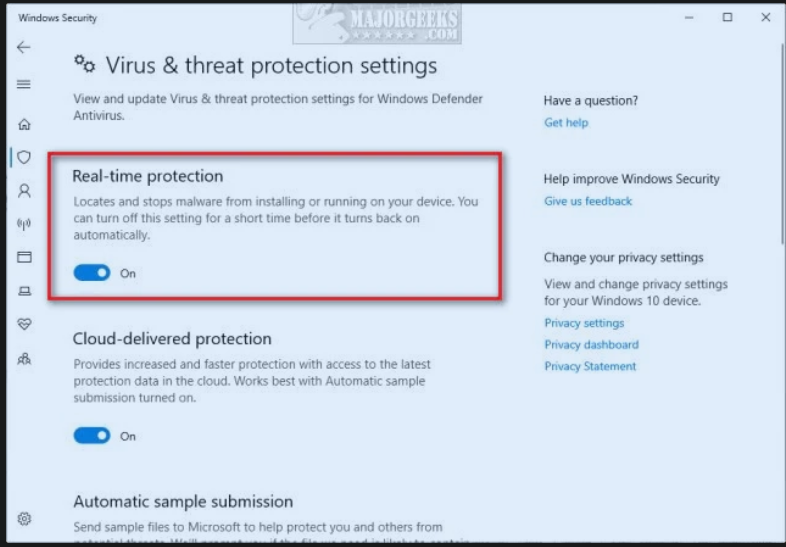
Real-time analysis, conversely, is a mechanism integrated directly into antivirus tools. Even Windows Defender’s real-time protection feature utilizes this mechanism. Essentially, this analysis occurs continuously throughout your computer usage. It monitors network traffic, identifies unfamiliar processes (visible in Task Manager), and tracks the API calls made by these processes. All suspicious activities are recorded, leading to swift action.
- Advantages of this method:
- Provides a more comprehensive and thorough understanding of whether a file is malicious.
- Increases accuracy, detecting malware even if it employs obfuscation techniques.
- Disadvantages of this method:
- Extremely time-consuming. The analysis and detection of a malware file can take from a few minutes to a few days, months, or even years, depending on the sophistication of the malware and the specific conditions.
- Resource consumption. Running monitoring processes on the computer often causes the performance of the machine to decrease (Warning: Disabling these features for faster performance could lead to disastrous consequences, a strong contender for a Darwin Award!)
- Some advanced malware can detect if it’s running in a sandbox, either behaving benignly or refusing to execute altogether (as we saw in the WannaCry attack, read in LabLog0).
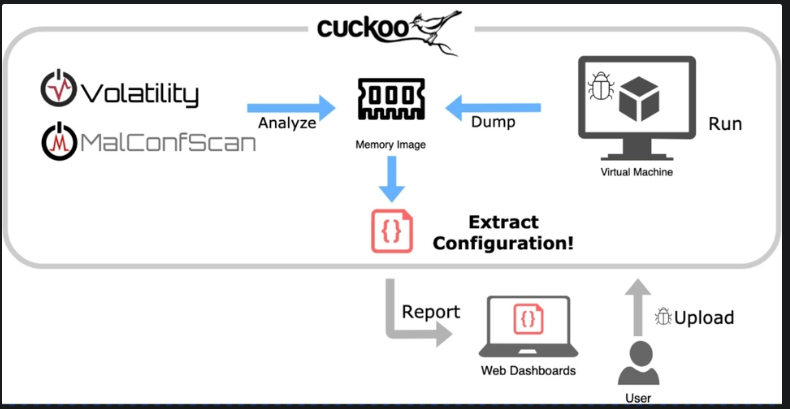 And in some cases, tools combine both static and dynamic methods to achieve the most accurate results. This integrated approach is known as hybrid analysis.
This concludes today’s article. In the next article, I will delve into the history and evolution of antivirus tools. We will explore how malware detection methods have evolved and improved over time!